Webhook URL Parameters
When working with webhooks in PolyAPI, you can capture data from both the URL path and query parameters, not just the request body.
Most webhooks receive data in the HTTP request body (Event Payload), but many systems also send information through URL path and query parameters. PolyAPI makes it easy to see and control how these URL parameters are processed!
Adding parameters to webhooks
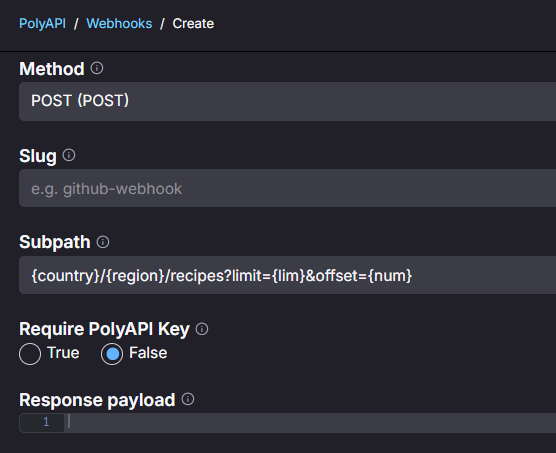
When creating the webhook, scroll down to the subpath field and define the query and/ or path parameters for the webhook. This field explicitly shows the structure PolyAPI uses to parse parameters from the URL, including both path and query parameters. This allows you to preview exactly how incoming parameters will be extracted.
We can add parameters to a webhook as shown in the image below:
How parameters are resolved
When a webhook is triggered, the connected Server Function is executed. The values passed to the function as a parameters object (path and query) and are resolved by merging parameters from the incoming URL against the Webhook Subpath template as shown below:
Source |
Example Subpath |
Example Incoming URL |
Resolution Logic |
Parsed Params |
|---|---|---|---|---|
Static Values |
|
|
Value is taken only from the template, overriding any caller value. |
{
    "meal": "dinner"
  }
|
Dynamic Params |
|
|
Value is taken from the URL, but the key is the renamed template key (secretCode). |
{
    "secretCode": "123"
  }
|
Path Params |
|
|
Value is taken from the URL, but the key is the renamed template key (userID). |
{
    "userID": "987"
  }
|
Remaining Caller Params |
(Not in template) |
|
Any parameters from the caller’s URL not defined in the template are passed through with their original key. |
{
    "fruit": "apple"
  }
|
Executing a webhook with parameters in Canopy
In the PolyAPI UI, when you’re viewing or testing a webhook, the interface provides a clear structure for how information is extracted from the incoming URL.
Below is an example of testing parameters in the UI.
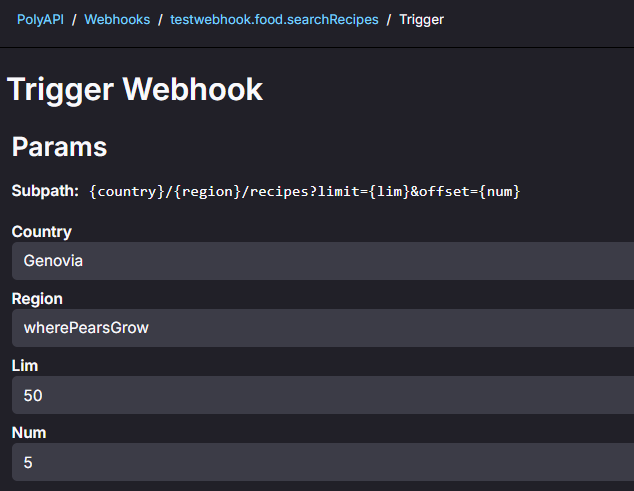
These parameters will evaluate to:
{ "country": "Genovia", "region": "wherePearsGrow", "lim": 50, "num": 5 }
Warning
For a dynamic query like ?param1={secretCode}, the key in paramsPayload is secretCode (the name inside the braces), not param1.
If the caller repeats the same query key (?tag=a&tag=b), last value wins. To send a list, use a CSV string or another array encoding the server function can parse.
These values arrive on the server function as paramsPayload. See Events and Triggers.
Conclusion
That’s it! You now know how to:
Parse URL path and query parameters in your webhooks
Test webhooks with parameters from PolyUI
Understand how parameter resolution works when merging template and incoming values
For more on securing your webhooks, check out Webhook Security Functions.